
Introduction
Tesla supply their own app for customers to manage their Tesla products. If you’re a Powerwall 2 or 3 user, you’ll already be familiar with the app, what it can and can’t do.
For those who want simplicity, who want a system they can set and leave, who don’t want to or have any interest in actively managing their Powerwall then the Tesla app should meet their needs.
With features such as Storm Watch, the Tesla app is very capable, but as soon as a user wants to have more granular control or conduct deeper analysis then the limitations start to show.
For power users, this is where the Netzero app comes in as a more flexible companion to the Tesla app.
This review breaks down:
- What the Netzero app does well
- Where it falls short
- Whether it’s actually useful in real-world scenarios
What Is Netzero for Powerwall?
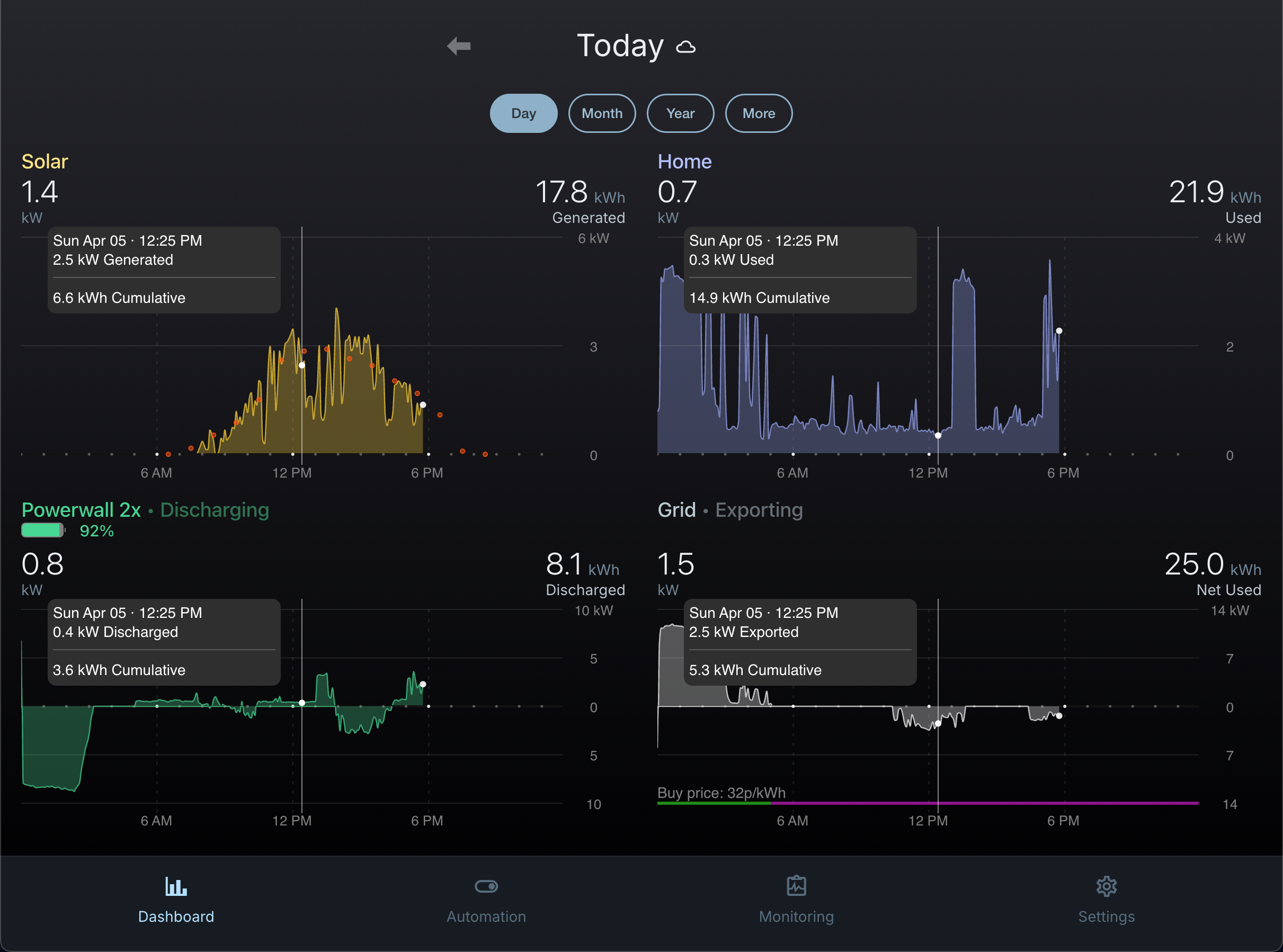
Netzero is a third-party, cross-platform application which connects to your Tesla Powerwall 2 or 3. Netzero doesn’t give you more data than Tesla, but it gives you more ways to work with it and provides:
- Solar generation prediction
- Mobile app and web browser experience
- Automations and scheduling of Powerwall configuration changes
- Notifications for specific events
- Monitoring of Powerwall health and output from solar array(s)
- Detailed historical data for analysis
- Better visualisation of Powerwall data
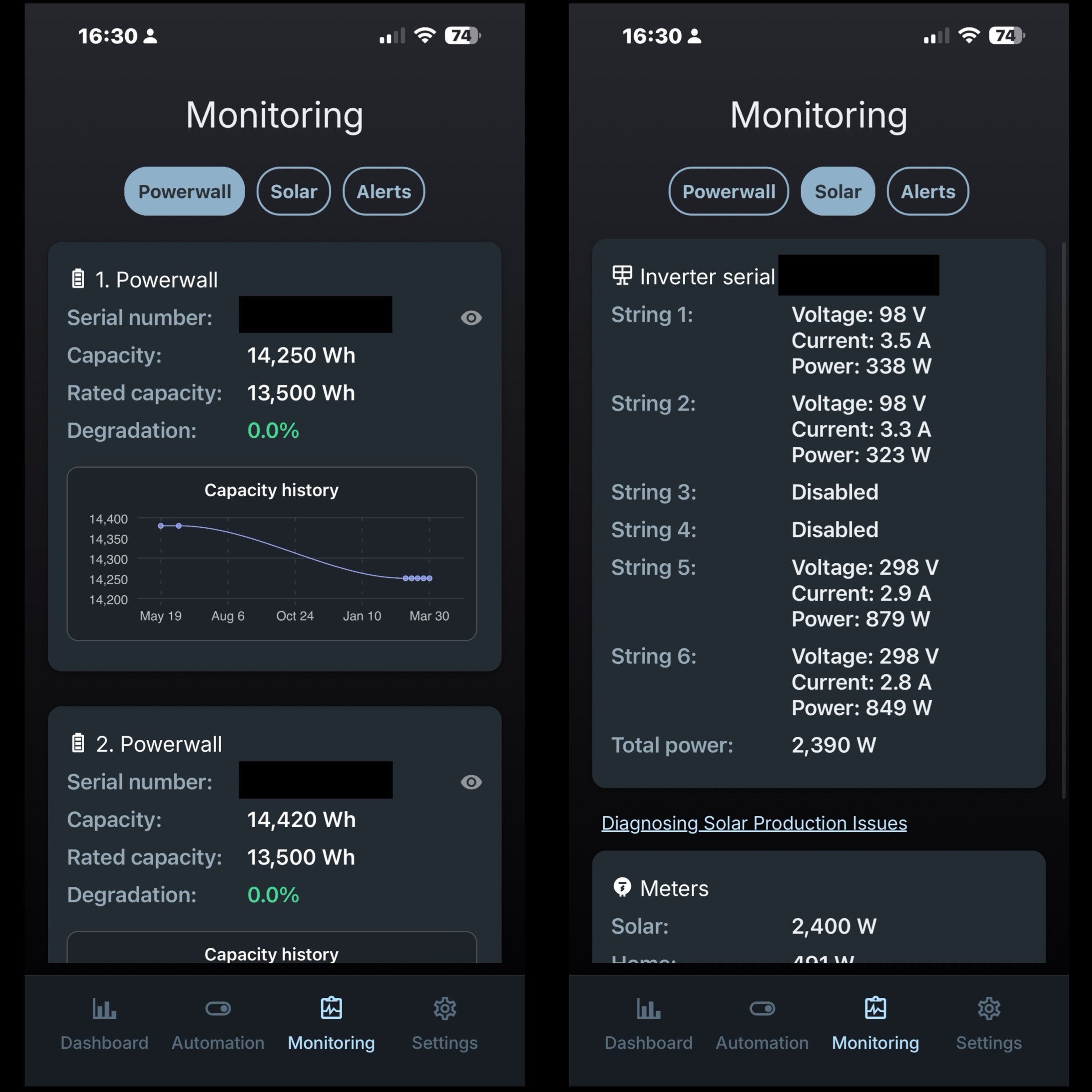
Why the Tesla App Isn’t Always Enough
The main issue isn’t that the Tesla app is bad - it’s deliberately designed to provide a simpler user experience.
Limitations:
- Poorer presentation of data for analysis
- No way to automate or schedule different operating behaviours
These limitations can quickly become restrictive if you care about:
- Optimising usage
- Understanding import/export behaviour
- Evaluating return on investment (ROI)
Key Features of Netzero
1. Better Visualisation
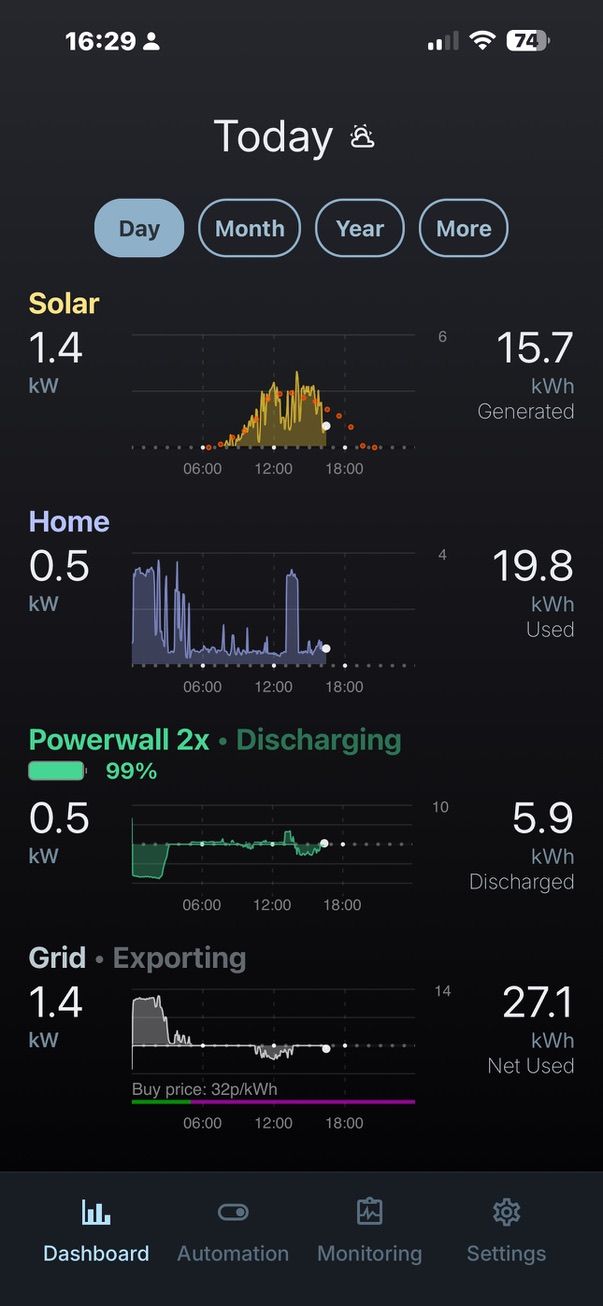
Compared to the graphs offered in the Tesla app, Netzero’s are:
- More informative in a single view
- Clearer to look at and easier to interpret
- More flexible
2. Granular Energy Flows
You get a clearer breakdown of:
- Solar generation
- Grid import/export
- Battery charge/discharge
These are useful for understanding how your system is actually behaving and where opportunities to reduce costs are being missed.
3. Automation
Automations are the key differentiator with Netzero. Whilst all of the improved user experience mentioned above is available for free, there is a charge to access more advanced features such as automations and diagnostics.
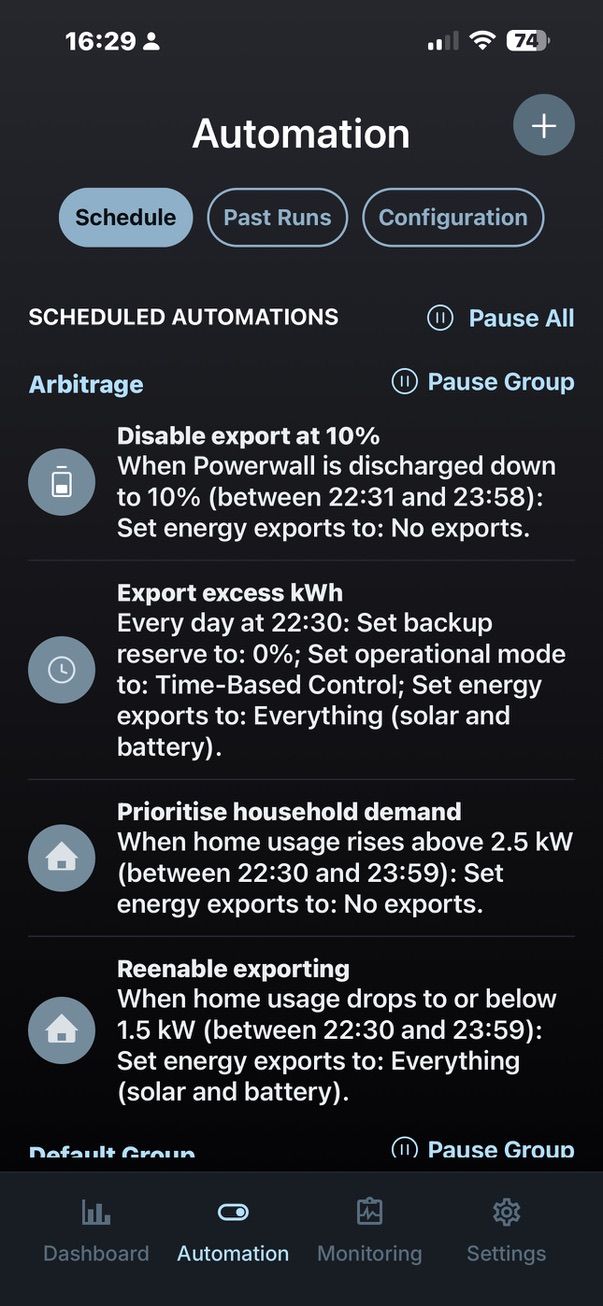
With a paid subscription (£6.99 per month or £69.99 per year), Netzero offers automations which allow you to change Powerwall settings under specific circumstances or when events happen. Netzero uses Tesla’s Application Programming Interface (API) to change Powerwall configuration so it’s not necessarily doing anything which the Powerwall can’t natively do, but it enables the user to wrap conditional logic around settings.
Example Automations
You can set up automations such as:
- Enabling solar export once the battery reaches a defined state of charge
- Enhanced EV charger automation
- Enable export during peak periods or before an overnight cheap period
- Stop exporting when the battery drops to a certain percentage
- Adjusting behaviour based on time or conditions
This effectively allows you to:
- Influence Tesla’s logic through configuration changes
- Optimise for cost instead of just self-consumption
Events Are the Key
Automation rules are event-based. In other words, rules are triggered when something happens, not when a condition remains true.
This means they are triggered when defined events occur e.g. at 10am or when the Powerwall is at 80% state of charge or when household demand is greater than 3kW or when your EV is charging or when the price of electricity goes above 30p/kWh.
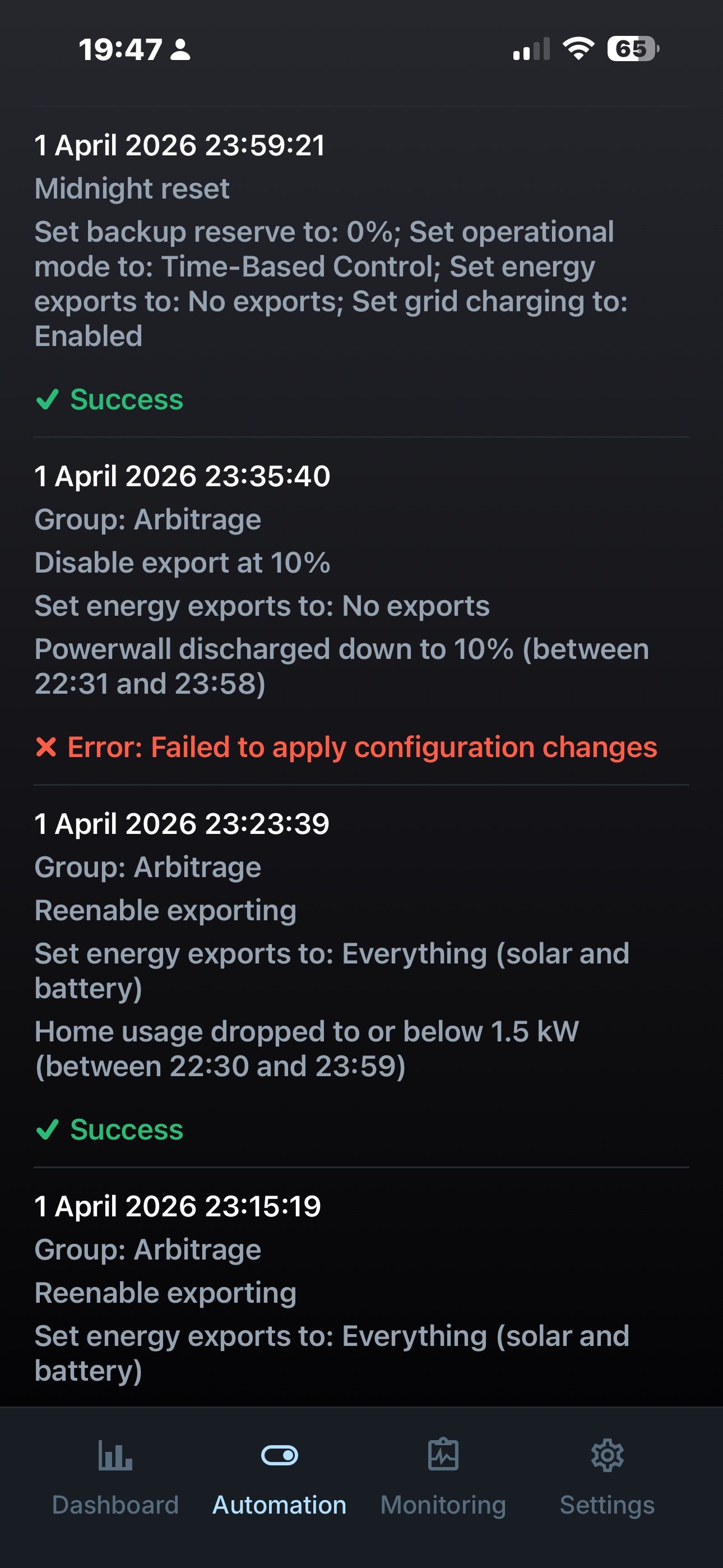
This event-based approach works for most use cases, but support for true state-based rules would make it more robust and easier to reason about.
For example, being able to enable solar exports if the battery is charged above 90% is more robust than enabling solar exports when the battery reaches 90% state of charge.
As automation rules are event-triggered, there’s a risk that a rule won’t be fired as expected. State-based rules could provide more reliability.
Netzero allows you to automate the configuration changes, but Tesla’s Powerwall algorithms will always have the final say in what it actually does. For example, you may enable exporting, but that doesn’t mean the Powerwall will actually export.
4. Netzero API
Netzero provides its own API for users to programmatically access Powerwall data via Netzero. This is much more straightforward than signing up for access to Tesla’s own API and then actually making use of it.
With Netzero, you’re provided with an API token and ID for your Powerwall from within the app and that’s all you need to communicate with the Netzero servers.
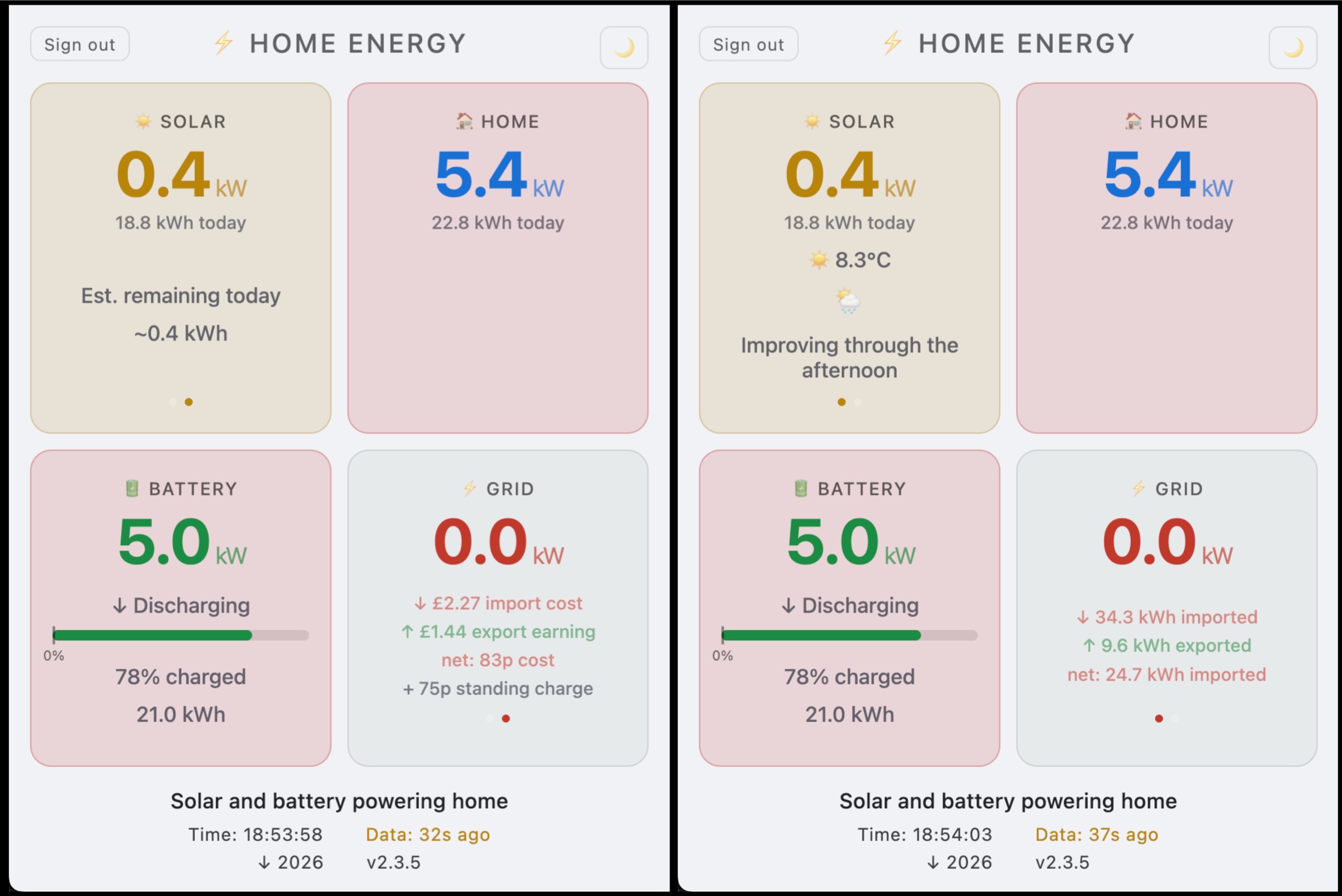
For advanced users, this brings about a whole world of opportunities for more advanced automations and custom interfaces like this simplified dashboard.
Real-World Use Cases for Netzero
Improved Visuals
For many users, the improved single-screen view of system behaviour is reason enough to use Netzero. If you have an unused tablet lying around then get the app and stick it on a wall.
Reviewing System Performance
If you want to understand how your system has performed over a specific period (e.g. a week or month), Netzero makes that process more straightforward. You can do the same in the Tesla app, but you have to navigate around the app more.
Optimising Battery Size Decisions
Use the improved graphs to see when your battery is filling up, when your household demand is, when your battery depletes and you start importing from the grid. In my case, having this data available led to a decision to double the amount of battery storage with a DC Expansion Pack.
Analysing Tariff Strategy
If you’re on time-of-use tariffs or EV tariffs then you can evaluate whether you’re actually benefiting from them and where the optimisation opportunities might be. The likes of Octopus Flux provide a short overnight window of cheaper import together with a generous export peak rate between 4-7pm.
Netzero makes it easier to relate your battery state of charge to household demand. This gives you a better chance of avoiding grid import during peak periods and perhaps exporting when rates are most favourable.
Is Netzero for Powerwall Worth It?
If you’re only monitoring Powerwall performance and don’t want to pay the subscription then Netzero offers an alternative view from the Tesla app which can be beneficial if you’re that way inclined.
If you’re wanting to automate your Powerwall settings and willing to pay for it then it’s an excellent option.
Home Assistant is another free option for automations, but comes at the cost of complexity as the set up is significantly more involved and better suited to technical users.
Netzero doesn’t change how your Powerwall fundamentally operates, but it does give you more ways to work with it and it can reduce manual intervention and friction.
For users who value having more visibility and the ability to experiment with their setup, it’s a genuinely useful addition.
For everyone else, the Tesla app will likely remain sufficient.